07:30Shutter up
Take the money. The books keep themselves.
One till for card, contactless and bank transfer. A QR menu your customers read in their own language, with all 14 allergens on it. Every sale reaches your accounts the same day.
- Payments by Stripe
- All 14 FSA allergens
- No monthly fee
- No contract
One trading day
Five moments where the money moves.
A takeaway on Green Lanes, from the shutter going up to the books closing. Every shop runs these five moments. Only the details change.
Swipe, or use the arrows
Everything in the box
One platform, and it already does the job.
No add-ons to buy, no modules to unlock. Everything below is included in the same rate.
Taking the money
Tap to Pay on your phone
Take contactless payments on an Android phone with no reader at all. Live for UK merchants.
Stripe card readers
Chip, contactless and phone wallets on Stripe hardware, paired from your dashboard rather than by an engineer.
Pay by Bank
Your customer pays straight from their banking app at 0.89% + 20p, around half the card rate.
Pay at the table
The customer scans the code on the table, orders and pays from their own phone. Nobody queues to settle up.
Tips, on the customer's phone
The customer adds a tip themselves when they pay from the table. It reaches the same books as the sale.
Running the floor
QR menu with all 14 allergens
Every FSA allergen sits on the item, on the customer's phone, before they choose it. Change it once and every code shows it.
QR codes you print yourself
Generate a code for the shop or one per table from your dashboard, print it, stick it down. No reprints when a price changes.
Live order screen
Table orders arrive priced and in sequence, so the kitchen and the till are looking at the same thing.
Quick sale for anything else
A numpad for the thing that is not on the menu. Type the amount, take the money; the VAT is worked out for you.
Four languages
English, Türkçe, हिन्दी and 中文, for your staff and for your customers.
Keeping the books
Sage, posted automatically
Every sale reaches your accounts as a sales receipt the same day, with the VAT where it belongs.
Refunds that reconcile
Sale and refund arrive as two matched documents, so the day still adds up.
Takings and reports
What came in, by method, by day, exportable as a CSV your accountant already knows.
Staff accounts and roles
Invite your team, give each person the access their job needs, and keep the bank details to yourself.
Open from anywhere
One web platform. Check the till from home, from the other shop, or from the cab.
Money in your bank, every day
Payouts run daily on a seven-day rolling basis. Once the first week is through, one lands every day, in pounds, straight into your own account.
And when the broadband drops
The S710 reader carries its own mobile connection, so a line going down at the shop does not stop you trading.
What it costs
Priced so you can do the sum in your head.
One rate per payment type. Nothing monthly, nothing to sign, nothing that appears later.
Pay by Bank
0.89% + 20p
per Pay by Bank payment
Your customer pays straight from their banking app. Same till, same books, around half the card rate.
Cards from 1.79% + 20p
- Pay by BankLowest rate
- 0.89% + 20p
- Standard UK and domestic cards
- 1.79% + 20p
- Premium and commercial domestic cards
- 2.80% + 20p
- All international cards, premium included
- 3.40% + 20p
- No monthly fee
- No contract
- No hidden fees
Not the cheapest card rate on the market. The most you get for it.
In the price, at no extra cost
- Interface and support in four languages
- Allergen QR menu
- Sage sync and CSV export
- QR self-ordering
Against the till you have
What you actually get for it.
This compares what a till can do, not what it charges. Rates move about; the jobs a shop needs doing do not.
| SimEX Pay | Square | SumUp | Zettle | |
|---|---|---|---|---|
| Interface in Turkish, Hindi and Chinese | Yes | No | No | No |
| All 14 FSA allergens on the menu | Yes | No | No | No |
| Customers order from their own phone | Yes | Not applicable | No | No |
| Sales post to Sage automatically | Yes | No | No | No |
| CSV export | Yes | Yes | Yes | Yes |
| Works with Stripe readers | Yes | Not applicable | Not applicable | Not applicable |
| Contactless and chip | Yes | Yes | Yes | Yes |
| No monthly fee | Yes | Yes | Yes | Yes |
Swipe the table to compare Square, SumUp and Zettle
Compiled from each provider's own public documentation in July 2026. Features change; check before you switch.
Straight answers
The questions people actually ask.
If yours is not here, write to us and we will answer it in the language you asked in.
What it costs
What does it actually cost?
0.89% + 20p for Pay by Bank, 1.79% + 20p for standard UK and domestic cards, 2.80% + 20p for premium and commercial cards, and 3.40% + 20p for international cards. That is the whole list.
Is there a monthly fee or a contract?
No to both. You pay when you take a payment, and you can stop whenever you like without giving notice.
Are there setup fees or hidden charges?
No setup fee, no terminal rental, no charge per member of staff. The rate on this page is the rate.
What does it cost to start?
Nothing. Tap to Pay turns an Android phone into the card machine, so your first payment does not need any hardware at all.
Pay by Bank
What is Pay by Bank?
Your customer pays you straight from their own bank instead of using a card. They approve it in the banking app they already have, and the money reaches your books the same way a card sale does.
Is it cheaper than a card?
For you, yes: 0.89% + 20p against 1.79% + 20p on a standard card, so roughly half. It costs your customer nothing either way.
Does my customer have to install anything?
No. They are handed to the bank they already use, approve the payment there, and come straight back.
Can I still take cards?
Yes. Pay by Bank sits next to cards, contactless and phone wallets. The customer chooses; you do not have to.
Getting started
How long does setup take?
An afternoon. Sign up, verify your business with Stripe, put your products in, print your QR code.
Do I need to buy a card reader?
No. Tap to Pay on an Android phone takes contactless payments with no reader at all, and it is live for UK merchants. Add a Stripe reader later if you want a counter, a printed receipt, or something to hand across.
Which reader should I get, if I want one?
The S700 for a fixed counter. The S710 if you move about, because it carries its own mobile connection. The WisePOS E if you want to take payment at the table.
Where does my money go?
Into your own bank account. You connect it during setup and payouts go straight there.
Running the shop
Does it work in Turkish?
Yes, and in English, Hindi and Chinese. Your staff pick their own language for the till, and your customer picks theirs on the QR menu.
Can my staff use it without seeing my bank details?
Yes. You invite your team and give each person the access their job needs. Payout and bank settings stay with the owner.
What if the shop's internet goes down?
The S710 carries its own mobile connection, so it keeps trading when the broadband does not. With no connection at all a reader cannot take a payment, and that is true of every card machine.
Can I refund a customer?
Yes, in full or in part, from the same screen that took the payment. The sale and the refund each reach your books as their own document.
Your money and your books
Do you hold my money?
No, and SimEX Pay is not a bank. Payments are processed by Stripe and settle into your own Stripe account. Your takings never sit with us.
When do I get paid?
Payouts run daily on a seven-day rolling basis. Once the first week is through, a payout lands every day, in pounds, in your own account.
Will it work with my accountant?
Sales post to Sage automatically as sales receipts, with the VAT where it belongs. Everything also exports as a CSV any accountant can open.
Does the menu handle allergens?
Every item carries the 14 FSA allergens, shown on the customer's phone before they order, alongside the disclaimers you are required to display. SimEX structures and shows the information; the accuracy of what you enter about your own dishes stays yours.
The hardware
You do not have to buy anything to start.
Tap to Pay turns the Android phone in your pocket into the card machine, for nothing. Add a Stripe reader when you want a counter, a printed receipt or a device your staff can hand over. Fixed counters take the S700; taxis and market stalls take the S710, which carries its own connection.
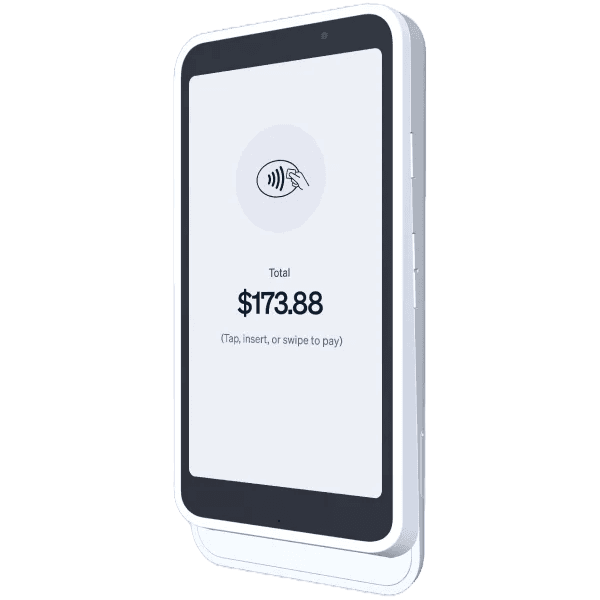
Stripe Reader S700
The countertop workhorse. WiFi, made for fixed venues: cafés, salons, clinics and shops.
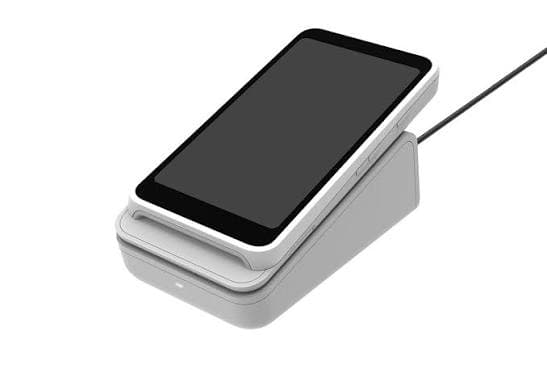
Stripe Reader S710
WiFi plus cellular, so the reader travels with you: taxis, pop-ups and food trucks.
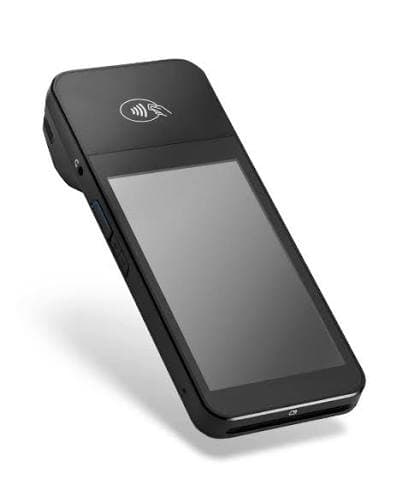
BBPOS WisePOS E
The proven handheld. Take payment at the table, in the queue, wherever the customer is standing.
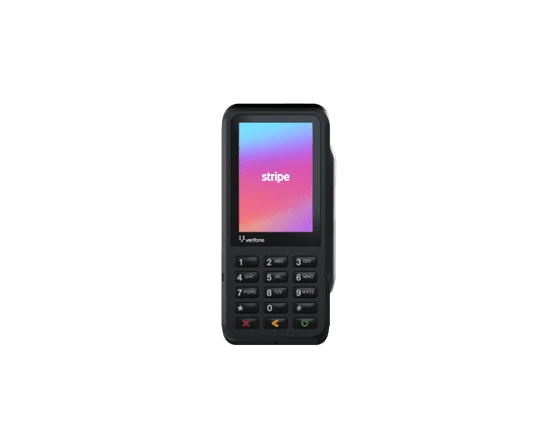
Verifone P630
Countertop reader with a built-in PIN pad.
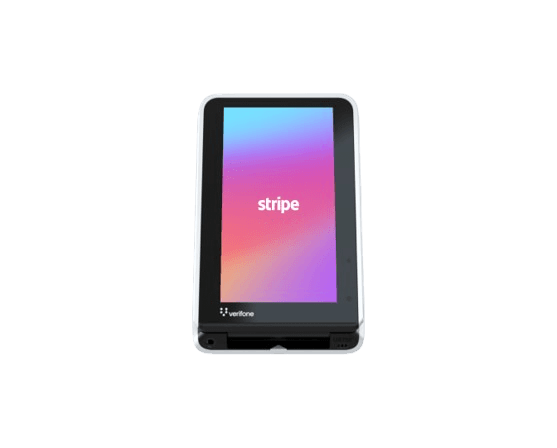
Verifone UX700
Weatherproof kiosk built for self-service.
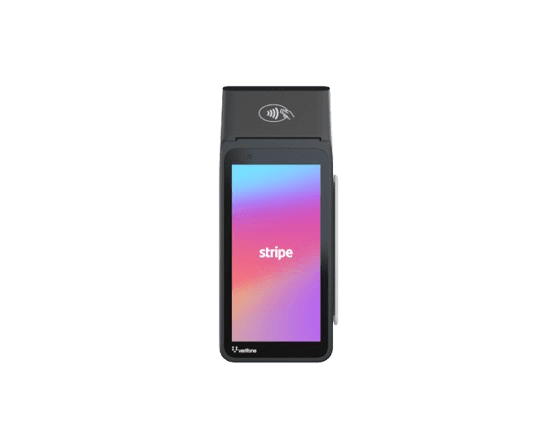
Verifone V660p
Handheld with a built-in receipt printer.
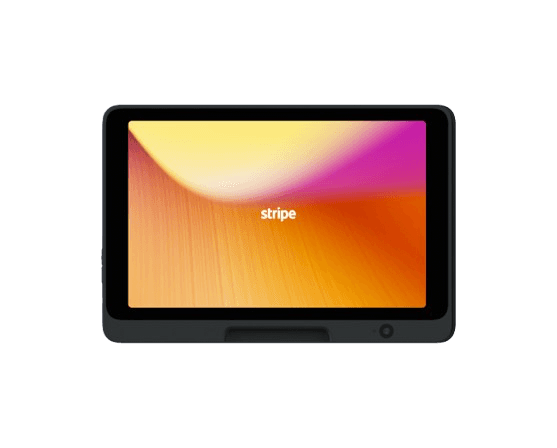
Stripe Reader T600
Countertop smart reader that runs your POS.
All readers are supplied and certified by Stripe.
22:41
Open tomorrow on SimEX Pay.
Sign up, verify with Stripe, put your menu in. Setup takes an afternoon, not an install date.
No monthly fee, no contract, and you can leave whenever you like.